Boots are located in cv06.img:
From unnamed_7801.bin to unnamed_7816.bin
=============================================
There are several variants of importing/exporting bin files (for you boots):
AFS Explorer 3.7
1. Start AFS Explorer and go to menu FILE - IMPORT IMG File
2. From your img folder open xxx.img (backup it first)
3. Answer NO to questions and the file will be opened.
4. Go to Action > Import Folder and choose the folder with the unpacked files that match this img.
6. Answer YES to questions and the file will be opened.
7. Now save the “xxx.img” as “1xxx.img”
8. Wait for end of rebulding and answer Yes to the next questions
and the file will reloaded
9. Close AFS Explorer
10. Remove your old “xxx.img” and rename the new “1xxx.img” to “xxx.img”
Legend:
xxx - name of the chosen img file
===========================================
Game Graphic Studio 7.4
1. First open xxx.img file (here is cv06.img)
2. Find the bin files i mentioned above (From unnamed_7801.bin to unnamed_7816.bin).
3. Right mouse click on the bin (boot) file you want to change and select import. Then choose the bin file where is the boot you want to import.
===========================================
Kitserver:
Copy Bins to respective folder in Kitserver.
cv05.img: unnamed_99.bin (Boot preview)
cv06.img: unnamed_7801.bin - unnamed_7816.bin (Boots)
pdata.img:
unnamed_2.bin —> Boot previews
unnamed_3.bin - unnamed_5.bin —> Menus
unnamed_12.bin —> adidas F50.9 (black)
unnamed_13.bin —> adidas F50.9 (white)
6/10/09


Tutorial PES2009 online by Xplode
Acest tutorial este dedicat celor care doresc sa joace Pes2009 online. Este foarte simplu, urmati cu atentie pasii urmatori:
1. Sfatul meu este sa reinstalati jocul curat (fara alte patch-uri sau modificari)
2. Cand intrati prima data in Pes2009, aveti grija ca antivirusul sau firewallu sa nu blocheze incercarea jocului de a se conecta la internet (dati allow).
3. Trebuie sa instalati ultimul update (1.4) de la Konami, dupa care sa copiati in folderul jocului un crack special. Update-ul si crack-ul le puteti downloada de aici. Cand o sa instalati update-ul o sa vedeti ca dureaza mai mult. Nu va speriati. Asteptati linistiti ca nu s-a blocat.
4. Dupa ce ati instalat update-ul de la konami intrati in joc. Dati din nou “allow” la antivirus/firewall si intrati in System settings >> Download

Asteptati sa downloadeze.
Atentie!
Daca ati avut instalat konami patch 1.3 si vreti sa instalati konami patch 1.4 peste s-ar putea sa va dea erori si sa nu mearga (mie asa mi s-a intamplat). In acest caz reinstalati jocul curat, bagati decat konami patch 1.4, copiati crack-ul special dupa linkul care vi l-am dat si apoi treceti la pasul 4 si continuati pasii.
Toti cei care participa in campionatul de PES2009 online trebuie sa aiba konami patch 1.4 instalat !
5. Intrati in C:\WINDOWS\system32\drivers si dati click dreapta >> Properties pe folderul etc. Debifati Read Only pentru toate subfolderele.

6. Acum aveti nevoie de un programel cu ajutorul caruia va veti conecta cu prietenii online. Il puteti downloada de aici. Il dezarhivati direct in folderul jocului. Ar trebui sa aveti asa:

7. Dati click pe Wizard >> Install Certificate si asteptati. O sa se deschida si inchida mai multe ferestre. Nu apasati pe niciuna. Dupa ce si-a terminat treaba va apara un mesaj: “Successfully Installed!“.
8. Apoi dati click pe Check certif. La fel o sa se deschida o fereastra si o sa intre in niste registrii. Nu dati click pe nimic, lasa-ti sa isi faca treaba. La final va trebui sa va apara asa ceva:

Daca aveti asa ceva asta inseamna ca totul a decurs bine.
9. Da-ti click pe Fix Settings.exe. O sa va deschida automat settings.exe din folderul jocului. Debifati Auto si Enable UPnP si dati ok. Totodata verificati daca portul este 5739.
10. In acest moment sunteti gata sa jucati Pes2009 Online. Aici aveti 2 variante: sa fiti host (cel care face serverul) sau client. In ambele cazuri selectati ip-ul pe care il aveti din meniul Select your IP.
Atentie!
In cazul in care unul dintre jucatori are un ip incepand cu 192…. va trebui sa folositi programul Hamachi. In acest caz, ambii jucatori va trebui sa selecteze ip-ul de hamachi din meniul Select your IP.
11. In cazul in care sunteti Host dati direct Launch. In cazul in care sunteti Client da-ti click pe Client, baga-ti ip-ul celui care a facut serverul si apoi dati Launch dar numai dupa ce acesta a intrat in joc si a facut camera de joc.
12. Dupa ce ati dat Launch se va porni jocul. Intrati la Network. Trebuie sa va apara cam asa ceva:

Da-ti OK si apoi YES. Veti ajunge ajunge in fereastra de Login. Introduce-ti orice GAME ID numai din cifre si orice GAME ID PASSWORD, apoi da-ti Login. Apoi da-ti de 3 ori enter la meniurile ce vor aparea. Trebuie sa ajungeti in acest meniu:

13. De aici este simplu si logic. Match room si Create Room iar la tip sa fie Friendly daca sunteti Host sau Search for a match room si tipul Friendly daca sunteti Client.
Ballpack Tutorial---PES 2009 PC
Required Tools:
* Game Graphic Studio
* Kitserver 8 - must be properly installed
* Image-editing program (Adobe Photoshop (I use 7.0 other tutorial is expected for other versions but are analogous), GIMP (freeware, download for example here: Chip.de), etc.)
Provided by me, Tools: Download (includes a tutorial. Txt, screenshots, sample folder structure, the two. Psd files, as well as a. ATN file for Photoshop)
1. Preparation
The first thing you have to be clear about what balls you have ever ball in his pack would like to see, to stand a total of 10 courses to choose from (in Figure 1.1 marked with orange). The 10 balls are then only in the ball game with free choice selected (Friendship Game, Get to legend, master league, etc.), in addition, there is a slot for the ball, CL modes. What the other balls are because I have not tried.
After looking out the balls to add the. Bin files (in the balls for PES 2008/2009 are both texture and model in the same file) in the following sub-folder of the PES 2009 installation directory: “… \ Pro Evolution Soccer 2009 \ kitserver \ img \ cv01.img “and renames them according to the numbers of Figure 1.1 in order to:
for 1 Ball game selection: “xyz_2.bin”
for 2 Ball: “xyz_3.bin” (xyz refers to any word that is most unnamed_x.bin elected)
…
for 8 Ball: “xyz_9.bin”
for 9 Ball: “xyz_12.bin”
for 10 Ball: “xyz_14.bin”
CL for the ball: “xyz_11.bin”
Result should look like: Figure 1.2
And to complete preparations, we need a picture of each ball, you can either search through a search engine or you can use, as in my example (Fig. 1.3), a screenshot ( “print” button and then click in an image editing program into a new document):
Fig.1.1: 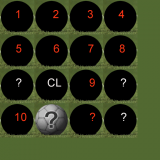 Fig.1.2:
Fig.1.3: 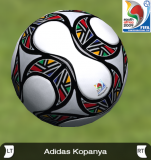
2. Creating the Graphics Preview
For each of the sought-out photos of the background must now be removed to take the selection ellipse and a circle of moves exactly with the edge of the ball closes and returns this selection, with a right click on the selection and a subsequent click on “Invert Selection” order (Fig. 2.1). Then press the “Delete” button so that only the ball left. (Fig 2.2)
If the layer in the Layers dialog than background must be kept so, before removing with a double click on the layer and then clicking OK, change. (Fig. 2.3)
Next, the ball to the right size market. I have the above downloaded an action file (extension:. ATN) settled for Photoshop, the file you need to open with Photoshop, then cut the ball selected in the log dialog to tab switch action, the cutting action in the folder and select Preview Ball Action with a click on the small triangle run. Result: Figure 2.4 This. ATN file does nothing other than that they first work on the smaller ball (in Photoshop is the function of trimming), and then the size of the image is changed (Width: 3.77 cm, height: 3, 74). In case you for some reason. ATN can not use / want (for example, because it uses a different Bilbearbeitungsprogramm) you can of course also the steps of hand-carried.
Now it opens the file “Konami_Preview_Bälle.psd” from the Download and insert the ball, using copy, between the two levels of the file. (Fig. 2.5)
Png should be saved as a result of this to come out: Fig 2.6.
Fig.2.1: 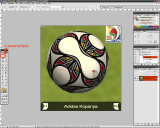 Fig.2.2: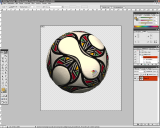
Fig.2.3: 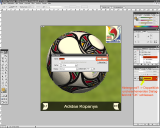 Fig.2.4: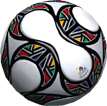
Fig.2.5: 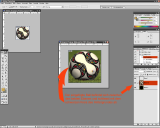 Fig.2.6: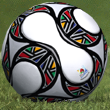
After each of the balls such a small graph is created, open the “Download the attached” preview_cv05_unnamed_136.psd “and add the small balls the numbers accordingly. (Fig. 2.7)
For the CL Preview ball must not be created because the vacant position is not in the game is displayed.
These ready-made graphics from their stores and add them into the GGS unnamed_136.bin the folder cv05.img in Kitserver On. (Fig. 2.8)
Fig..2.7: 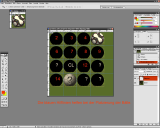 Fig..2.8: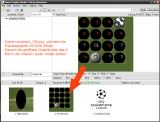
3. Designation of balls
Finally, we still favor the ingame also the correct name is displayed. To do this we create in the “names” folder of the Kitservers a text document named “balls.txt” which is structured as follows:
# Ball names map
# Format: , “”
# where ball number is an integer from 1 to 15.
1, “Ball 1″
2, “Ball 2″
3, “Ball 3″
4, “Ball 4″
5, “Ball 5″
6, “Ball 6″
7, “Ball 7″
8, “Ball 8″
11, “Ball 9″
13, “Ball 10″
Always use the correct name (in my case, the “Adidas Kopanya” instead of the ball 4) and finished the ball pack.
New Clint Dempsey Superfly
New Clint Dempsey Superfly by Beris

Real Madrid is hoping Kaka can deliver them a Champions League trophy like he did for Milan in 2007
The first Galacticos era under Florentino Perez has not been viewed too kindly by history.
Overblown salaries and egos are remembered, and not with great affection. Too many big names, and not enough team unity seems to have been the overriding summation of Perez's unique experiment.
When the inevitable end came, it came with ugly recriminations for many concerned.
But, amidst the hedonism and glitter, there were some highlights. None more so than the Champions League title the club won at Hampden Park in 2002, thanks to a sumptuous volley from Zinedine Zidane.
The Frenchman, one of the greatest players ever to grace the game, arrived at Madrid in 2001 for a world-record €73.5m. Along with Luis Figo he was one of the original Galacticos, and invariably the best.
But in the long run, that wasn't enough.
Back for a second bite at the cherry, the returning Madrid president is hoping history can repeat itself for the Galactico experiment — initially at least. But with Zidane retired (he now acts as an advisor for the club), a new talisman had to be found for a club noticeably lacking in leadership.
For Zidane in 2001, then, read Kaka in 2009.
In the Brazilian, Real Madrid hope they have found the player to reassert their position at the forefront of European football.
Unveiled yesterday for the eye-watering fee of €65m, the former AC Milan attacking midfielder is arguably the modern player most reminiscent of Zidane in his pomp.
The 27-year-old might be more sprightly across the turf with the ball at his feet, but he possesses the nearest approximation to the consummate touch and vision that the Frenchman always exhibited.
Cristiano Ronaldo and Lionel Messi might be the two names most frequently mentioned in conjunction with the phrase "the best player in the world," but over the last five years, it is hard to argue that Kaka has played at a higher level than his two illustrious peers.
His new employers, perhaps unsurprisingly, clearly agree.
"Kaka, who many consider the best footballer on the planet, now plays for Real Madrid," Madrid stated bullishly on their website. "What he does from here on out will only add to his legend and that of Real Madrid."
For their part, AC Milan were remarkably sanguine about the loss of their greatest player. In the current economic climate, such a vast sum of money simply could not be turned down.
"It will be very difficult to fill the void that will be left by Kaka, a shining example of commitment and professionalism," a statement on the club's website read. "The Rossoneri offer him the most cordial and affectionate wishes for the continuation of his sporting career."
The player himself admitted that the transfer had been completed with the club's approval.
"Everything I've always done for Milan has been by mutual agreement, from the moment I arrived until my departure today," he said.
"The world financial crisis has taken a lot of people by surprise and some clubs, such as Milan, also suffered. This is the best way to help the club at the moment."
While the sale of Kaka has all but solved the Italian club's financial problems — chief executive Adriano Galliani admitted last week the club was losing €70m a year — Perez is hoping that the player will solve Madrid's own footballing recession.
Second in La Liga this season, it was clear to all observers that the club were streets behind the accomplished and exuberant football played by arch-rivals Barcelona.
As the Catalan giants grabbed every trophy in sight, Real seemed to lurch from disaster to disaster. The fans demanded change.
In the end, change seemed to mean regression as Perez was re-elected. But Kaka's signing, while clearly indicating a return to Galactico's policy, also hints at a slightly adjusted approach.
Where past Galacticos signings might have been as much for economic reasons as tactical ones — David Beckham being the obvious example, as the club turned down Ronaldinho in his favor as the Brazilian was deemed "too ugly" to be a marketable asset — this time it appears football has been prioritized.
Kaka does not have the world image of Messi or Ronaldo. But by adding his creativity, poise and threat to their side, Perez is hoping the club will be back challenging, and winning, the game's biggest trophies in the very near future.
The club's footballing recession would be over.
And in the long run, being successful on the pitch makes more money than any other method.
Kaka is just the first high-profile piece to Madrid's puzzle. Cristiano Ronaldo might indeed end up being the second piece, David Villa the third. But that is not the real issue.
Last time, Perez's undoing was to forget about the smaller pieces — the unfashionable water carriers like Claude Makelele who allow the attacking superstars to perform. Possessing the likes of Luis Figo, Ronaldo, and Zidane was great — but worthless without a rigid and disciplined defensive structure.
Will the likes of Lassana Diarra — the nearest approximation to Makelele in the current squad — find a place in the Galacticos Mark II?
Will the signing of a worldclass defensive midfielder (Javier Mascherano, for example) be sanctioned?
For all the attacking talent in the world, it is questions like these that will decide whether Perez's second coming is more successful than the first.


Sale helps Milan's bottom line, but will it help Real's?
The first Galacticos era under Florentino Perez has not been viewed too kindly by history.
Overblown salaries and egos are remembered, and not with great affection. Too many big names, and not enough team unity seems to have been the overriding summation of Perez's unique experiment.
When the inevitable end came, it came with ugly recriminations for many concerned.
But, amidst the hedonism and glitter, there were some highlights. None more so than the Champions League title the club won at Hampden Park in 2002, thanks to a sumptuous volley from Zinedine Zidane.
The Frenchman, one of the greatest players ever to grace the game, arrived at Madrid in 2001 for a world-record €73.5m. Along with Luis Figo he was one of the original Galacticos, and invariably the best.
But in the long run, that wasn't enough.
Back for a second bite at the cherry, the returning Madrid president is hoping history can repeat itself for the Galactico experiment — initially at least. But with Zidane retired (he now acts as an advisor for the club), a new talisman had to be found for a club noticeably lacking in leadership.
For Zidane in 2001, then, read Kaka in 2009.
In the Brazilian, Real Madrid hope they have found the player to reassert their position at the forefront of European football.
Unveiled yesterday for the eye-watering fee of €65m, the former AC Milan attacking midfielder is arguably the modern player most reminiscent of Zidane in his pomp.
The 27-year-old might be more sprightly across the turf with the ball at his feet, but he possesses the nearest approximation to the consummate touch and vision that the Frenchman always exhibited.
Cristiano Ronaldo and Lionel Messi might be the two names most frequently mentioned in conjunction with the phrase "the best player in the world," but over the last five years, it is hard to argue that Kaka has played at a higher level than his two illustrious peers.
His new employers, perhaps unsurprisingly, clearly agree.
"Kaka, who many consider the best footballer on the planet, now plays for Real Madrid," Madrid stated bullishly on their website. "What he does from here on out will only add to his legend and that of Real Madrid."
For their part, AC Milan were remarkably sanguine about the loss of their greatest player. In the current economic climate, such a vast sum of money simply could not be turned down.
"It will be very difficult to fill the void that will be left by Kaka, a shining example of commitment and professionalism," a statement on the club's website read. "The Rossoneri offer him the most cordial and affectionate wishes for the continuation of his sporting career."
The player himself admitted that the transfer had been completed with the club's approval.
"Everything I've always done for Milan has been by mutual agreement, from the moment I arrived until my departure today," he said.
"The world financial crisis has taken a lot of people by surprise and some clubs, such as Milan, also suffered. This is the best way to help the club at the moment."
While the sale of Kaka has all but solved the Italian club's financial problems — chief executive Adriano Galliani admitted last week the club was losing €70m a year — Perez is hoping that the player will solve Madrid's own footballing recession.
Second in La Liga this season, it was clear to all observers that the club were streets behind the accomplished and exuberant football played by arch-rivals Barcelona.
As the Catalan giants grabbed every trophy in sight, Real seemed to lurch from disaster to disaster. The fans demanded change.
In the end, change seemed to mean regression as Perez was re-elected. But Kaka's signing, while clearly indicating a return to Galactico's policy, also hints at a slightly adjusted approach.
Where past Galacticos signings might have been as much for economic reasons as tactical ones — David Beckham being the obvious example, as the club turned down Ronaldinho in his favor as the Brazilian was deemed "too ugly" to be a marketable asset — this time it appears football has been prioritized.
Kaka does not have the world image of Messi or Ronaldo. But by adding his creativity, poise and threat to their side, Perez is hoping the club will be back challenging, and winning, the game's biggest trophies in the very near future.
The club's footballing recession would be over.
And in the long run, being successful on the pitch makes more money than any other method.
Kaka is just the first high-profile piece to Madrid's puzzle. Cristiano Ronaldo might indeed end up being the second piece, David Villa the third. But that is not the real issue.
Last time, Perez's undoing was to forget about the smaller pieces — the unfashionable water carriers like Claude Makelele who allow the attacking superstars to perform. Possessing the likes of Luis Figo, Ronaldo, and Zidane was great — but worthless without a rigid and disciplined defensive structure.
Will the likes of Lassana Diarra — the nearest approximation to Makelele in the current squad — find a place in the Galacticos Mark II?
Will the signing of a worldclass defensive midfielder (Javier Mascherano, for example) be sanctioned?
For all the attacking talent in the world, it is questions like these that will decide whether Perez's second coming is more successful than the first.
Subscribe to:
Posts (Atom)


